


What is bitrate in video?
Bitrate is the amount of data the camera records per second of video, measured in Mbps (megabits per second). Higher bitrate means more data describes each frame, which generally results in better image quality — especially in scenes with lots of detail, motion, or color variation.
How bitrate affects video quality
At low bitrate, the codec throws away more information to compress the video. This creates visible artifacts — macroblocking (chunky squares in dark areas), banding in gradients, and smearing of fine detail during motion.
Higher bitrate gives the codec more room to preserve detail. A 4K video at 400 Mbps will look noticeably sharper than the same footage at 100 Mbps, especially in complex scenes.
The tradeoff is file size. A 10-minute clip at 400 Mbps produces roughly 30 GB, while at 100 Mbps it is about 7.5 GB.
Common bitrate ranges
50-100 Mbps: Standard quality. Fine for social media, YouTube, and everyday content.
100-200 Mbps: Good quality. Suitable for professional work with moderate color grading.
200-400 Mbps: High quality. Recommended for commercial work and heavy color grading.
400+ Mbps or RAW: Maximum quality. Cinema-grade, requires fast memory cards and large storage.
High bitrate cameras at Camera Shop Egypt

Canon EOS R5 C Mirrorless Cinema Camera
Available on backorder
| Sensor | Full-Frame 45MP CMOS |
|---|---|
| Megapixels | 45 MP |
| Video Resolution | 8K60 RAW / 4K120 |
| Video Format | 12-Bit Cinema RAW Light, JPEG, C-RAW |
| Autofocus | Dual Pixel CMOS AF II with Eye, Face, Head & Animal Detection, 1053 AF Zones |
| Continuous Shooting | Up to 20 fps |
| Mount | Canon RF (EF compatible via adapter) |
| Memory Slots | CFexpress Type-B + SD UHS-II Dual Slot |
| Recording Time | Unlimited Internal Recording |
| Connectivity | Wi-Fi (5GHz / 2.4GHz), Bluetooth, Timecode DIN Port, Multi-Function Shoe, HDMI RAW Output |

Sony a7S III Mirrorless Camera
In stock
| Sensor | 12.1MP Full-Frame Exmor R BSI CMOS (Back-Illuminated) |
|---|---|
| Megapixels | 12.1 MP |
| Video | UHD 4K 120p, 10-Bit 4:2:2 Internal, 16-Bit RAW Output, up to 600 Mb/s |
| ISO Range | 80-102400 (Extended: 40-409600) |
| Autofocus | 759-Point Fast Hybrid AF (Phase + Contrast Detection), covers 92% of frame, down to -6 EV |
| Image Stabilization | 5-Axis SteadyShot In-Body Image Stabilization |
| Viewfinder | 9.44m-Dot QXGA OLED Electronic Viewfinder |
| Screen | 3.0-inch 1.44m-Dot Vari-Angle Touchscreen LCD |
| Continuous Shooting | 10 fps, up to 1000 Uncompressed RAW Files |
| Storage | Dual CFexpress Type A / SD Card Slots |
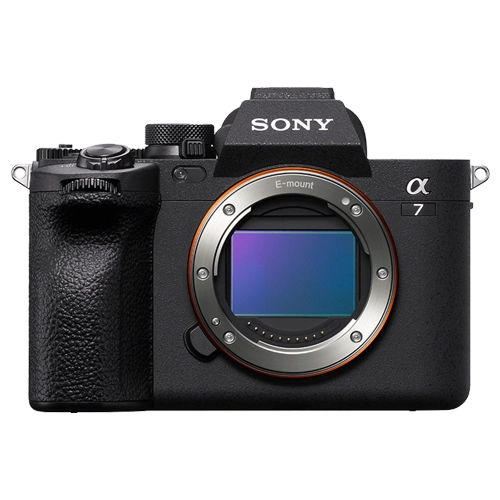
Sony a7 IV Mirrorless Camera
In stock
| Sensor | 33MP Full-Frame Exmor R BSI CMOS |
|---|---|
| Megapixels | 33 MP |
| Processor | BIONZ XR |
| Video | 4K 60p 10-Bit, S-Cinetone, S-Log3, XAVC HS / XAVC S-I up to 600 Mb/s |
| ISO Range | ISO 100–51200 |
| Autofocus | 759-Point Fast Hybrid AF, Real-Time Eye AF, -4 EV sensitivity, ~94% coverage |
| Image Stabilization | 5-Axis SteadyShot In-Body |
| Continuous Shooting | Up to 10 fps (mechanical or electronic shutter, AF/AE on) |
| Viewfinder | 3.68m-Dot EVF, 120 fps Refresh Rate |
| Screen | 3-inch 1.03m-Dot Vari-Angle Touchscreen LCD |
| Mount | Sony E-Mount (Full-Frame) |
| Connectivity | 4K 15p UVC/UAC Live Streaming via USB Type-C |
Does higher bitrate always mean better?
Not always. Bitrate interacts with codec efficiency. A modern H.265 codec at 200 Mbps can look as good as an older H.264 codec at 400 Mbps because H.265 compresses more efficiently.
What matters more is whether you have enough bitrate for your content. Talking-head videos need less than complex action scenes.
Also consider your memory cards — high bitrate requires V60 or V90 rated SD cards, or CFexpress for the highest bitrates.
For YouTube and social media, 100-150 Mbps in 4K is more than enough. For professional work with color grading, aim for 200 Mbps minimum. Always match your card speed to your bitrate.